Wisconsin Department of Children and Families - Division of Early Care and Education
Bureau of Early Care Regulation
Child Care Certification Policy Manual
Effective 2/15/25 certifiers must upload the signed certificate of approval in order for the provider to be able to view it in the Child Care Provider Portal.
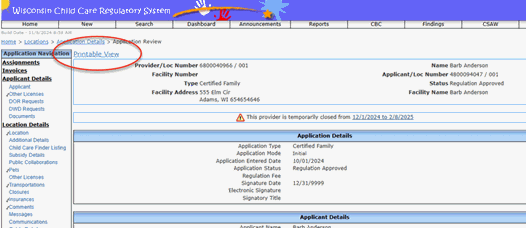
Effective 2/25/25, the online application must be uploaded as a PDF for certification agencies to preserve/retain as a historical public record. Uploading the PDF is important should there be an administrative appeal hearing or litigation of audit of the provider record. See the CCPP User Guide: Online Licensing/Certification Applications for instructions on how to upload the online application. The application can be saved as a PDF on the application review page (click on Printable View).
Background Check Request (BCR) Form if a paper form(s) is submitted
Documentation of training in SIDS and department approved SBS/AHT training, unless completed as part of the Introduction to the Child Care Profession or Principles of Child Care Certification. The Introduction to the Child Care Profession includes training in SIDS if completed September 2001 or later and includes SBS/AHT training if completed July 1, 2005 or later. Principles of Child Care Certification includes both SIDS and AHT.
Pre-service Training Documentation including, but not limited to:
Certificates of completion for the Introduction to the Child Care Profession, Principles of Child Care Certification, or acceptable alternative
Certificates of completion for the Fundamentals of Family Child Care or acceptable alternative
Infant/Child Cardiopulmonary Resuscitation (CPR) certificate, including renewal certificates.
Training in Child Abuse & Neglect (CAN) (Effective 9/30/19) if an alternative to the Introduction to the Child Care Profession was used to meet pre-service training requirements.
2665 – Compliance Statement – Family (use the WISSCRS-generated save and upload feature)
Plan of Correction
Sanction/Enforcement Letters
Online applications must be uploaded when submitted by clicking on the "printable view". See the WISCCRS User Guide Reviewing Online Applications for instructions.
WISCCRS User Guide – Documents provides instruction on how to upload other documents in WISCCRS:
Note: The size of a document cannot exceed 4MB. If you try to upload a document larger than 4MB, the system currently displays ‘Unable to Process’ message. If this error message displays when you are trying to upload a document, check the size of the document that you are trying to upload. If it is larger than 4MB, please review the Optimal Scanning section for ways to reduce the document size.
This page last updated 06/2025.